At a glance
| How to use this guide
|
When a Samsung freezer stops freezing properly, the first clue is often not a puddle or an alarm. The drawer still looks cold, but the freezer is no longer holding its side of the bargain. When a samsung freezer not freezing complaint starts to show up in real life, the cause can sit in very different places: cooling off mode, demo mode, incorrect temperature settings, a struggling evaporator fan motor, a defrost system problem, a thermistor fault, or, in the harder cases, compressor failure.
The tricky part is that these problems sometimes make the freezer look almost normal while food quality keeps slipping. This guide explains the problem the same way an experienced technician does: by behavior, by sequence, and by what the machine is doing. We’ll cover the warning signs, the error codes, the safe checks worth making at home, and the point where a freezer warm complaint stops being a simple adjustment and turns into a repair job. Keep reading to sort out what is simple, what is serious, and what needs repair.
Start with the display: mode, settings, and the clues already on the panel
On a Samsung freezer call, the panel can save a lot of wasted time. Before anyone starts blaming the fan, the compressor, or the sealed system, look at what the machine is showing you. Some freezers are sitting in cooling off mode. Some are simply set wrong. Some are already flashing error codes that narrow the problem fast.
That is where this diagnosis starts.
Quick panel check
What you see | What it usually points to | What to do next |
|---|---|---|
OF OF / O FF / OFF OFF / scrolling bars | cooling off mode or demo mode | Turn the mode off and let the freezer start cooling |
Freezer set too warm | Incorrect temperature settings | Set it correctly and give it time to settle |
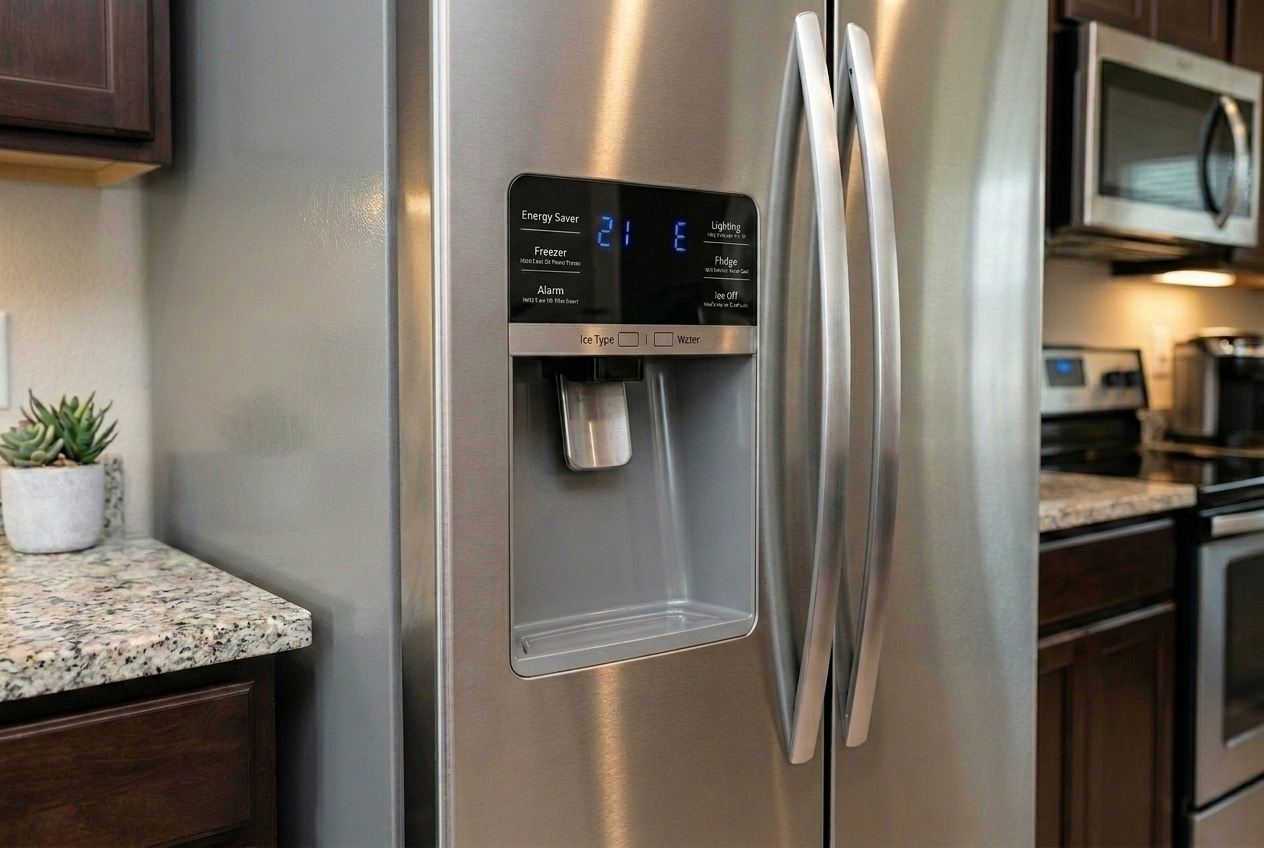
21E | Fan-side cooling trouble | Check airflow and the evaporator fan motor next |
83E / 85E / 86E | Compressor or power-side cooling issue | Treat it like a serious repair problem |
No code, but food is soft | The panel is only part of the story | Move on to airflow, frost, and internal behavior |
Cooling off mode and demo mode
This is one of the easiest misses on Samsung refrigerators because the unit can still look alive. The lights come on. The controls respond. The freezer still looks normal when you open it. Meanwhile, the cooling system is not doing the work.
If the display is showing OF OF, O FF, or a similar pattern, deal with that before you chase anything else. A freezer in demo mode can waste a whole afternoon if you mistake it for a real cooling failure.
- Look at the display before touching the settings
- If you see OF OF, O FF, or scrolling bars, you’re likely dealing with mode, not failure
- Turn the mode off
- Let the freezer pull temperature back down before judging the result
Temperature settings
The next thing that trips people up is the setting itself. A freezer that is set too warm will act exactly like a weak freezer. Then people start nudging the number down every hour, and by the end of the day nobody knows whether the machine is failing or just never got a fair chance to recover.
Set the freezer once, leave it there and give it time.
A quick hand check does not tell you much unlike frozen food.
Error codes
If the refrigerator is showing error codes, take a photo before you reset anything. That one step can save a lot of guesswork later.
On Samsung freezer calls, these codes matter early:
- 21E — freezer fan-side trouble
- 83E / 85E / 86E — compressor or power-related cooling trouble
The code will not repair the freezer for you, but it does stop you from heading down the wrong path.
Five-minute check before going deeper
- Look for OF OF, O FF, or scrolling bars
- Rule out cooling off mode and demo mode
- Verify the freezer temperature settings
- Stop changing the setting every hour
- Photograph any error codes before resetting power
When the freezer still feels cold
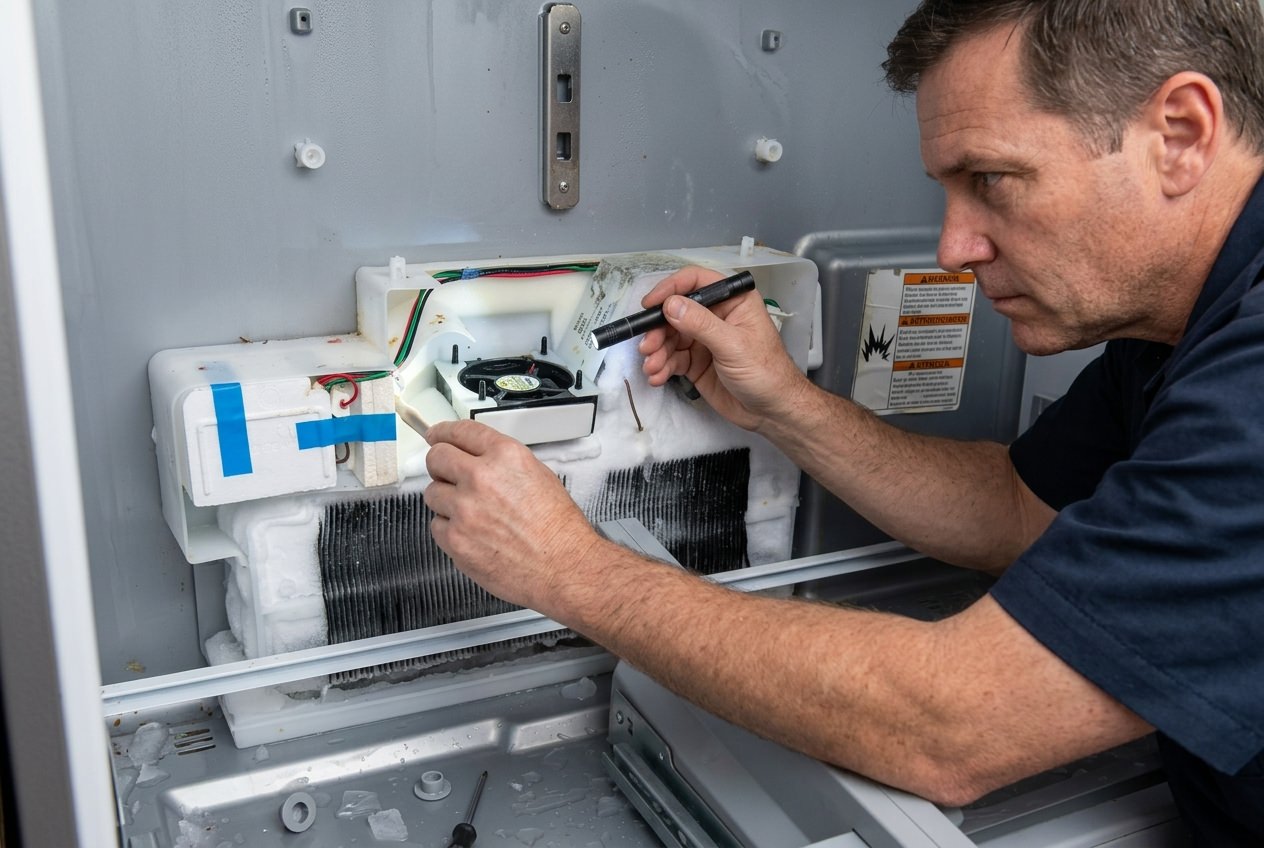
We see this on Samsung calls all the time. You open the drawer and cold air hits your hand, so the freezer seems fine at first. Then you grab the food. Ice cubes have fused together. Frozen fruit feels sticky. Meat has lost that solid, hard freeze. Sometimes all you see is a light patch of frost in the wrong place. That usually means the freezer is still making some cold, but it is no longer moving it or holding it the way it should.
Airflow and door sealing move to the top of the list here.
Why this stage fools people
A freezer can have a real cooling problem without looking obviously warm. Cold air may still be present. The problem is how that cold is moving through the compartment, and how much warm room air is getting back in every time the drawer closes.
That is why this kind of complaint gets ignored for too long. The drawer still feels cold. The display still works. Nothing looks dramatic. Meanwhile, food quality keeps sliding.
What we see in everyday practice
When airflow starts getting restricted, the freezer usually gives you one or more of these patterns:
- food near the vent stays harder than food farther away
- one drawer softens faster than the shelf above it
- frost collects on one area while another section looks undercooled
- the freezer improves after you rearrange items, then slips again
- the door shuts, but not with the same clean pull it used to have
None of that points to a compressor first. It points to the way cold air is moving or failing to move inside the compartment.
Airflow: small blockage, bigger effect than most people expect
Samsung freezers do not like to be packed tight. Bags pushed against the back wall, bulky boxes near the vent, a drawer riding slightly out of place — that is enough to start changing airflow.
Cold air has to circulate. Once that path gets crowded, the freezer starts cooling unevenly. The back corner may stay firm while the front of the drawer goes soft. A shelf might look fine while the lower section slips. Owners get that as “the freezer is acting weird.” We get it as an airflow clue.
Door sealing: easy to overlook, expensive to ignore
A freezer door does not have to hang open to cause trouble. A slight gap, a twisted gasket, food keeping the drawer from closing all the way, or rails not pulling in evenly will do the job.
Warm, humid air finds that opening fast. Then the freezer has to fight two problems at once: lost temperature and added moisture. That is when you start seeing frost in the wrong place, slower recovery, and food that no longer holds a clean freeze.
Quick table of patterns
What you notice | What it usually points to | What to check |
|---|---|---|
Top items stay harder than lower drawer food | Poor airflow | Vents, overpacking, drawer position |
Frost near the door edge | Weak seal or repeat warm-air entry | Gasket contact, drawer closure, food blocking the door |
Freezer feels cold, food still softens | Uneven air movement or poor recovery | Vent clearance, sealing, fan behavior |
Drawer needs an extra push to close | Rail, loading, or gasket issue | Drawer alignment and full closure |
Cooling improves after rearranging food | Air path restriction | Storage pattern and vent clearance |
Five-minute check at home
- Pull food away from the back wall and vents
- Make sure no package is keeping the drawer from closing fully
- Look for frost around the door edge or gasket line
- Wipe the gasket clean and check for twists or gaps
- Close the drawer and make sure it seals without needing a second push
- Leave the freezer alone long enough to see whether airflow was the issue
A quick tip
On these Samsung calls, a cold-looking freezer can waste a lot of time. Customers open the drawer, feel cold air, and assume the problem must be minor. We pay more attention to the food, the frost pattern, and the way the drawer closes. That tells the truth faster.
The defrost system
When frost starts building where air is supposed to move, freezer performance drops fast. That is why a Samsung freezer can still be running, still feel cold when you open it, and still stop freezing food the way it should. The machine is cold. The problem is that frost is choking the air path.
This is one of the most common reasons a freezer warm complaint drifts from a little off into food is starting to thaw.
Signs frost is taking over
- a thin frost patch on the back panel
- a fan noise that comes and goes
- ice cream getting soft even though the drawer still feels cold
- food in one section slipping before the rest
- a freezer that improves after a long unplug-thaw, then loses ground again
That last one is a big clue. If the freezer comes back after thawing and then fades again, the frost is coming back because the real problem is still there.
What the defrost system is supposed to do
Every freezer builds some frost. That part is normal. The defrost system is there to clear it before it turns into an airflow problem.
When that cycle slips, frost starts stacking up around the evaporator area, the vents, or the fan path. Cold air can no longer move the way it should. At that point, the freezer may still run for hours without holding a proper freeze.
That is why people get fooled by this problem. They hear the machine. They see the panel. They feel cold air. Meanwhile, the frozen food is already telling the truth.
Why a manual thaw feels like a fix
A full thaw clears the ice. For a short time, the freezer can breathe again.
That is why people plug the unit back in, watch it come back to life, and assume the problem is over. Then a few days later, the same symptoms return. Same soft food. Same frost patch. Same weak recovery.
A manual thaw is symptom relief. It is not a repair.
If the freezer keeps losing ground after thawing, the diagnosis has already moved past settings, loading, and casual DIY.
Frost pattern table
What you see | What it usually points to | What it means for the repair |
|---|---|---|
Light frost patch on the rear panel | Early defrost or airflow trouble | Catch it early before the fan path gets blocked |
Ice around the fan area | Frost is interfering with airflow | Fan and defrost sides need to be checked together |
Frost near the door edge | Warm air getting in | Look at drawer sealing and gasket contact |
Freezer improves after thawing, then fades again | Recurring frost restriction | The fault is still active inside the system |
Rear panel heavily iced over | Advanced defrost-side trouble | Internal diagnosis and repair are next |
A quick checklist before you call it a defrost problem
- Look for frost showing up in the same spot again
- Notice whether fan noise gets worse before cooling gets weaker
- Check whether the freezer improves after thawing, then slips again
- Watch for food softening in stages instead of all at once
- Check the drawer seal and loading, since warm-air entry can feed the frost buildup
A quick tip
When frost starts affecting the fan path, customers usually describe the freezer as working, but not right. That is a useful description. It usually means the cooling system is still alive, but the air path is already losing the fight.
Thermistor fault: when the freezer starts reading the room wrong
A Samsung freezer can lose its freeze without losing power, airflow, or basic operation. That is where thermistor fault starts coming into the picture.
The thermistor is the sensor that helps the control decide when to run, when to stop, and how hard to chase temperature. When that reading drifts, the freezer starts making bad decisions. It may run too long, then not long enough. It may recover slowly after the drawer opens. It may look fine for half a day, then slip for no clear reason.
This is one of the harder freezer problems to catch early because the signs do not always line up neatly.
Signs that push the diagnosis toward a thermistor fault
A sensor problem usually does not show up like a fan problem or a frost problem. It shows up as mixed behavior.
- the freezer is cold in the morning and soft by evening
- food quality keeps changing even though nothing around the freezer has changed
- the setting gets colder, but the food does not get meaningfully better
- the freezer recovers after being left closed, then loses ground again under normal use
- no heavy frost shows up, no major fan noise shows up, but the performance still is not right
That is where a thermistor fault starts climbing the list.
Why this one wastes time
Sensor trouble sends people in circles.
They lower the setting. They rearrange food. They unplug the unit. They power it back up. The freezer responds just enough to keep the guesswork going. That is why this fault drags on. The machine is still doing something. It just is not doing the right thing at the right time.
A bad sensor reading can make a freezer look inconsistent before it looks broken.
Sensor behavior vs. airflow behavior
Symptom pattern | More likely direction | Why |
|---|---|---|
Uneven freeze, fan noise, frost near vents | Airflow or fan-side trouble | Cold is not moving well |
Heavy frost returns after thawing | Defrost-side trouble | Ice is blocking the air path again |
Freezer temperature swings without a strong frost or fan pattern | Thermistor fault | The control may be getting bad temperature input |
Setting changes do very little | Sensor or control issue | The machine is not responding correctly |
Freezer acts different at different times of day | Sensor drift or control-side behavior | Cooling decisions are becoming inconsistent |
A short checklist before you move deeper
- The freezer is not in cooling off mode or demo mode
- The temperature settings are correct
- The drawer is sealing cleanly
- Airflow is not blocked
- No strong frost pattern is taking over the section
- No clear fan noise is pointing the diagnosis somewhere easier
If all of that checks out and the freezer still runs in a patchy, inconsistent way, sensor trouble starts making a lot more sense.
A quick tip
Customers usually describe this one as “it has good days and bad days”. That is a useful line. Freezers with airflow trouble or heavy frost usually leave a stronger physical trail. A thermistor fault leaves a behavior trail.
Compressor failure: when the easy fixes start dropping off the list
By the time compressor failure moves onto the table, the easier explanations are usually gone. The freezer is set correctly. The door is sealing. The vents are clear. You have already ruled out cooling off mode, demo mode, a simple loading issue, and the kind of frost problem that comes and goes with a thaw. The freezer is still warm, or it keeps sliding back after every short-lived recovery.
That is when the cooling system itself starts looking weak.
Signs the problem is moving past airflow and into serious repair
A weak compressor does not always drop the freezer all at once. More often, it loses pull. The freezer takes too long to get back down after the drawer opens. Food softens sooner than it should. Ice production slows down. Packages that used to stay rock hard start feeling heavy or half-set. The refrigerator may still run for long stretches, but the cold never has enough strength behind it.
You’ll usually see some mix of these signs:
- the freezer stays freezer warm even after the settings, sealing, and airflow checks are done
- food softens across the section, not just in one corner
- thawing comes back quickly after a manual reset or thaw
- the refrigerator runs a long time without pulling the freezer back into shape
- compressor-related error codes start showing up on the display, especially 83E, 85E, or 86E
Why this section is different
Airflow trouble leaves clues inside the compartment. Frost trouble usually leaves a pattern you can see. A weak compressor shows up in the way the whole freezer performs.
That is the split.
If one part of the drawer is soft and another part is still hanging on, airflow stays high on the list. If the whole section is losing its freeze, recovery is slow, and the refrigerator never seems to catch up, the job starts leaning toward the sealed side of the system.
Codes that puzzle customers
On Samsung refrigerators, 83E, 85E, and 86E are the codes that get your attention here. They point to compressor current or voltage-related trouble, and they can also show up after a power outage if the refrigerator does not restart the way it should. That is why a power-event history matters. A freezer that turned warm right after a storm reads differently from one that has been fading for weeks.
Weak airflow or weak compressor
What you notice | More likely direction | Why |
|---|---|---|
One shelf or corner softens first | Airflow or fan-side trouble | Cold is uneven |
Heavy frost returns after thawing | Defrost-side trouble | Ice is taking over the air path again |
The whole freezer is slipping | Compressor failure or deeper cooling trouble | The system is losing pull overall |
Long run times, weak freezing, slow recovery | Sealed-side or compressor trouble | The machine is working, but not delivering enough cold |
83E / 85E / 86E on the display | Compressor or power-side problem | The cooling system is under strain or failing to restart correctly |
A short checklist before you call it compressor trouble
- The unit is not in cooling off mode or demo mode
- The temperature settings are correct
- The door is closing and sealing properly
- Vents are clear and food is not blocking airflow
- No obvious frost restriction is taking over the freezer
- The freezer is still losing temperature across the whole section
- You have photographed any error codes before resetting power
If that list is already covered and the freezer still will not hold temperature, you are no longer dealing with a basic correction.
A quick tip
Customers often wait too long at this stage because the freezer is still “sort of cold.” That is the trap. A weak compressor can leave just enough cooling to keep the problem looking smaller than it is. Meanwhile, food quality keeps slipping and the repair does not get any simpler.
When Samsung RF Series (lawsuit) enters the conversation
This search usually shows up after the same freezer problem has come back more than once. The freezer stops holding temperature. Frost builds again. The fan gets noisy. The unit improves after a thaw, then slips again. That is usually when owners widen the search, and Samsung RF Series (lawsuit) starts showing up in the results.
That phrase gives useful context, but it does not diagnose the refrigerator in front of you. A repeat freezer complaint can still trace back to airflow, the defrost system, the evaporator fan motor, a thermistor fault, or deeper cooling trouble.
That is why this stage stays practical. Search history can point you toward a broader pattern. It cannot tell you whether this freezer is icing around the fan, losing temperature because of restricted airflow, or slipping because the cooling system itself is getting weak.
Quick read
What the owner says | What it usually means | What still needs to be checked |
|---|---|---|
“I found Samsung RF Series (lawsuit) online” | They’ve seen repeat complaint history around similar models | Frost pattern, airflow, fan behavior, codes |
“My freezer sounds like the same issue” | The symptom may overlap with known complaints | The failed part still has to be identified |
“This must be the same defect” | Maybe, maybe not | The freezer still needs a real diagnosis |
A quick tip
Search terms help customers describe what they’re seeing. They do not tell you which part failed.
What to check at home and what to stop doing
By this point, most readers want the same thing: a clean way to tell whether the freezer still deserves a little more checking or whether it is already in repair territory.
That line matters. A few smart checks can save time. Random trial-and-error usually does the opposite.
Start with the checks that help
These are worth doing because they give you usable information:
- make sure the freezer is not in cooling off mode or demo mode
- confirm the temperature settings are where they should be
- look for error codes before you reset anything
- clear food away from vents and the back wall
- make sure the drawer is closing fully and the gasket is sealing cleanly
- look for frost building in one spot instead of across the whole section
- notice whether the freezer improves after being left closed, or keeps slipping anyway
That is enough to sort the easy misses from the real repair calls.
We see the same time-wasting moves over and over on freezer calls. They make the symptom harder to read and rarely fix the problem.
Stop doing this:
- changing the temperature every hour
- unplugging the refrigerator every time the freezer feels a little off
- clearing error codes before taking a picture
- packing the freezer tighter because it feels cold enough
- treating one successful thaw as a finished repair
- buying random parts before the symptom has been narrowed down
A freezer that comes back for a day after a reset has not told you much. A freezer that keeps losing temperature after the same basic checks has told you a lot.
Useful move or wasted move
What you’re about to do | Useful or not? | Why |
|---|---|---|
Check the display for cooling off mode | Useful | Fastest way to catch a false no-cooling complaint |
Photograph error codes | Useful | Saves time and keeps the diagnosis cleaner |
Rearrange food blocking vents | Useful | Airflow problems are common and easy to miss |
Lower the setting again after one hour | Not useful | The freezer has not had time to respond |
Thaw it for the third time and hope | Not useful | Repeating the same symptom is not a repair |
Order a fan or sensor without diagnosis | Not useful | Too many freezer problems overlap early on |
When the problem has crossed into repair territory
A Samsung freezer is no longer in “watch it for a day” territory when you start seeing any of the following:
- food keeps softening even after the basic checks are done
- frost keeps coming back in the same area
- the freezer gets better after a thaw, then slips again
- the drawer feels cold, but food still is not staying frozen
- fan noise comes and goes, or airflow feels weak
- error codes point to fan or compressor-side trouble
- the whole section is losing temperature, not just one corner
That is the point where more DIY usually costs more than it saves.
A quick tip
If you have already checked mode, settings, sealing, airflow, and obvious frost, the next hour of guessing usually buys you less than a proper diagnosis. That is especially true on Samsung units, where fan trouble, frost trouble, sensor trouble, and sealed-system trouble can overlap at the start.
Conclusion
A freezer problem is easier to deal with when you stop treating every warm drawer like the same failure. That is where most wasted time comes from. One owner keeps lowering the setting. Another thaws the unit and hopes it holds. Someone else assumes the compressor is gone before checking the display. In our work, the better results usually come from reading the pattern early and calling the problem what it is.
This guide gives you a clearer way to look at a Samsung freezer that has stopped doing its job. Once you can tell the difference between a mode issue, an airflow problem, a frost problem, and a deeper cooling failure, the next step gets a lot easier. You stop guessing, chasing the wrong fix and losing time while the freezer keeps slipping.
If your Samsung freezer still is not holding temperature after the basic checks, that usually means the problem has moved past simple correction. At that stage, a clean diagnosis matters more than another reset. That is where professional repair starts saving money instead of adding cost.
FAQ
1. Why is my Samsung freezer running but not freezing?
Because “running” is not the same thing as “freezing correctly.” A Samsung freezer can stay powered on and still lose temperature because of cooling off mode, wrong temperature settings, restricted airflow, frost buildup, a weak evaporator fan motor, a thermistor fault, or deeper cooling trouble.
2. How do I know whether it’s cooling off mode or a real failure?
Check the display first. If you see OF OF, O FF, OFF OFF, or scrolling bars, the refrigerator may be in cooling off mode or demo mode. That is one of the easiest things to miss because the unit can still look alive even when it is not cooling.
3. What freezer setting should I use?
On most Samsung models, -2°F is the recommended freezer setting. After changing it, leave it alone long enough to see a real result. Constant adjustments muddy the picture.
4. Can a bad evaporator fan motor make the freezer feel cold but still let food soften?
Yes. That is one of the most common fan-side patterns. The compartment still has cold in it, but the air is not moving through the freezer the way it should. The result is uneven freezing, weak recovery, and food that starts softening before the drawer seems obviously warm.
5. Why does the freezer get better after thawing, then go bad again?
Because thawing clears the symptom, not the fault. If the freezer improves after a thaw and then loses ground again, frost is likely building back up for a reason. That usually pushes the diagnosis toward the defrost system, airflow trouble, or moisture getting in where it should not.
6. Should I reset the refrigerator when it shows an error?
Not before you take a picture. Resetting can wipe out useful code history and make the diagnosis harder.